Mevo Studio4.2.4
Publisher Description



Mevo Studio
Mevo enables live streaming with ease. With Mevo Studio, you can wirelessly connect multiple sources including Mevo Start and Mevo Core cameras, Mevo Go*, NDI* enabled devices, and UVC/webcams.* Easily switch sources, record, and live stream to multiple platforms like YouTube, Facebook and many others.
Wirelessly switch:
Wirelessly control multiple Mevo cameras at the same time and switch between them-live. Pan, zoom, and crop each camera view as needed for editing on the fly.
Instantly stream:
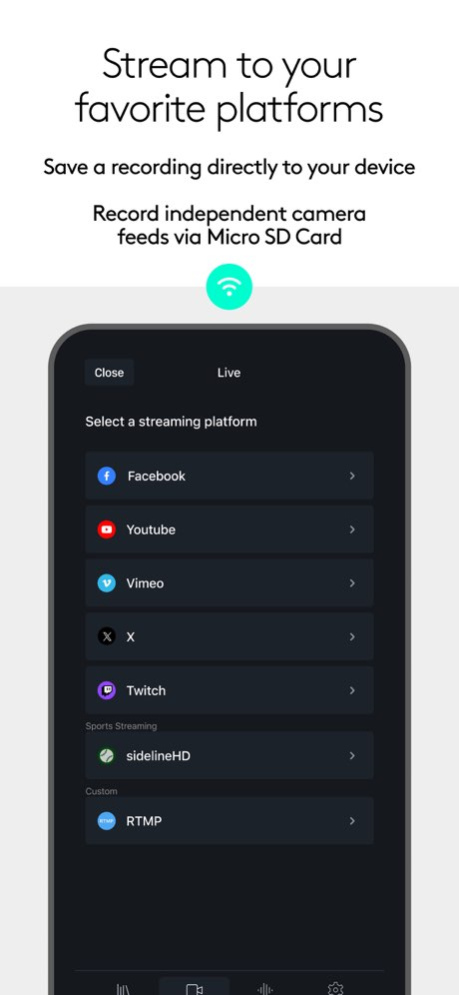
Stream instantly, With a few taps, to popular platforms like YouTube, Twitter, Twitch and more. Subscribe to Mevo Pro to multistream.*
Record:
Record your program output locally to your mobile device. Also record each individual camera feed directly to their local microSD card.
Add Media:
Add custom graphics including lower thirds, corner bugs, countdowns, and presentations, plus full screen images and media* to elevate your production value.
Create Custom Scenes:
Using the Scene creator, add live sources, graphics, or videos to use with a single tap.
Auto-Director:
Toggle auto-director and the app will live switch the show for you.
Audio Mixer:
Independently mix audio sources for the perfect sound.
Image Control:
Adjust each Mevo camera’s exposure and color settings for a high quality live stream.
Get more from Mevo with the Mevo Pro Subscription, including:
Multistream: Powered by Streamlabs, stream to multiple destinations while only needing the bandwidth of a single stream.
Mevo Go: You can share the camera, screen or audio of any mobile device directly to Mevo Studio.
NDI: Connect 3rd party cameras, camera or encoders that are NDI HX enabled or output Mevo Studio to an existing NDI workflow you may already be using.
Media: play videos, commercials or highlights to take your content to the next level.
Compatible with Mevo Core, Mevo Start, Mevo Plus, first-generation Mevo, and Mevo Go app.
Additional support:
Visit help.mevo.com
Annotation:
*Requires Mevo Pro subscription
Terms of Service: https://mevo.com/terms
Privacy Policy: https://mevo.com/privacy
Version History • Improved input from physical keyboards
• Added Edit Ethernet options to the setup flow 4.2.4 Sep 28 • bug fixes 4.2.3 Sep 8 ∙ Improved: NDI and SRT now support 1080p 60 4.2.2 Sep 4 • New: SRT settings are now included in the camera settings 4.2.1 Aug 27 • Improved the Mevo Setup
• Updated NDI library to version 6.3.2
• Fixed for an issue when certain media files would not playback.
• New: Browser Sources - Demo a website or add HTML/URL graphics. Simply type or copy and paste any URL to add it as a source next to all of your cameras and other assets. 4.2 Aug 13 • Fixed an issue where the HEVC toggle is missing when going live to GameChanger 4.1.6 Jul 24 • Minor improvements to the setup steps
• Fixed a bug playing back certain media files
• Fixed a crash when starting a record in Korean and Japanese languages 4.1.5 Jul 14 • New: white balance tint option.
• New: ISO priority exposure mode.
• New: you can now adjust Mevo Core HDMI settings.
• Fixed a crash when reopening the app with the NDI delay settings open. 4.1.4 Jun 24 • Re-enabled default positioning for graphics, countdowns and presentations. Use Default positioning so that every time that asset is added to a scene it’s in the same location.
• Fixed an issue with NDI 10-bit video not loading
• Fixed an issue where Studio would not remember the camera password
• Fixed an issue where some networks would still appear after being forgotten 4.1.3 Jun 15 • App crash fixes 4.1.2 May 23 - fixed an issue where password prompt reappears even when “remember password” was toggled on. 4.1.1 May 14 • New: Network Configuration - we are excited to announce that Mevo Start and Core will soon be available in new regions (listed below). Based on the new availability in these regions, we’ve expanded and improved our network configuration process to allow users the option to add Access Point and camera access passwords for added protection.
• New: Saved networks - gives you the ability to see and edit previously configured networks.
• New: Static IP - when connecting to wifi, you can now set a static IP.
• New: Multiple Camera Configuration - setup more than one camera when configuring wifi. This option will appear after the first camera has been successfully connected.
• New: Face Based Continuous Auto Focus (Mevo Core Only) - this feature is intended for use at the desk. The camera will track and maintain focus based on the location of a single face in the frame (and closest face if multiple are detected). If your face is lost by the system due to leaving the frame or being covered, focus will continue based on the center of the frame.
• New Regions: Turkey, Austria, Belgium, Croatia, Czech Republic, Germany, Hungary, Netherlands, Slovakia, Spain, Denmark, Finland, France, Norway, Sweden, United Kingdom, Italy, Australia, and Singapore. 4.1 May 12 • New: Media and Countdowns Behaviors - customize what happens when Media and Countdowns end or are removed from program (behaviors will expand to other features in the future).
• Improved/bug fix: when Media or Countdowns end, it will no longer hide the layer within the scene.
• Improved: audio muted stated is now remembered between sessions.
• Fixed an issue where some positioning sliders were not functioning properly within the Scene Creator.
• Fixed an issue where Google Cast would disconnect after 45 minutes. 4.0.6 Apr 20 • New: OIS (optical image stabilization) support - if your Mevo Core MFT lens supports OIS, you can toggle this via Image Control
• Improved: re-added on-tile controls for Media. Countdowns, and Presentations.
• Fixed an issue loading media 4.0.5 Apr 9 • Improved the ability to re-add live sources to the Studio tab when cameras are already connected via new “Add” button.
• Added a new “Edit Asset” button to the Scene tile for faster editing. Note: this is only available for Scenes with 1 layer.
• Added Mevo Camera battery status to the Scene tile and tile menu.
• Fixed an issue moving layers within the Scene Creator. 4.0.4 Mar 20 • fixed an issue where stream warning would not clear.
• fixed an issue when Countdowns would stop after updating the Scene.
• fixed an issue where the black frames could appear when using the Cut transition between the Scenes.
• bug fixes, crash fixes, and stability improvements. 4.0.3 Mar 17 - bug fixes and stability improvements 4.0.2 Mar 13 • fixed an issue where stream warning would not clear.
• fixed an issue when Countdowns would stop after updating the Scene.
• fixed a random crash 4.0.1 Mar 12 • New Library: A home base to manage live sources and other assets to be used within the Studio tab.
• New Studio: New and improve user experience for streaming and recording content using our new Scene feature.
• New Scenes: Create multi-layered scenes using live sources, graphics, presentations, countdowns, and media. Resize, position and frame each layer individual to create a unique and professional Scene. Use the Scene settings to define if it functions like Full Screen or Overlay. 4.0 Mar 3 • bug fixes 3.6.5 Feb 28 • fixed an issue where HEVC was not available for custom RTMP destinations
• improved Google Cast latency and stability 3.6.4 12/17/2025 - fixed a crash when using the audio mixer 3.6.3 10/10/2025 • Fixed a Facebook login issue in iOS/iPadOS 26
• Fixed a crash when restoring the app from the background 3.6.2 10/01/2025 • fixed an issue loading NDI Low Bandwidth Mode
• fixed an issue where graphics icons would incorrectly turn red
• fixed an issue where the App Update prompt would incorrectly appear 3.6.1 09/23/2025 • New: Outputs - you can now output your production through a number of different methods including HDMI through a supported USB-HDMI adapter (compatible device required), Airplay and Google Cast.
• Fixed an issue with audio from Focusrite Scarlett.
• Fixed an issue where source names wouldn't apply after saving.
• Fixed an issue where Mevo would remain in a Busy state after configuring a network. 3.6 09/18/2025
About Mevo Studio
The company that develops Mevo Studio is Logitech Inc.. The latest version released by its developer is 4.2.4.
To install Mevo Studio on your iOS device, just click the green Continue To App button above to start the installation process. The app is listed on our website since 2026-10-14 and was downloaded 261 times. We have already checked if the download link is safe, however for your own protection we recommend that you scan the downloaded app with your antivirus. Your antivirus may detect the Mevo Studio as malware if the download link is broken.
How to install Mevo Studio on your iOS device:
- Click on the Continue To App button on our website. This will redirect you to the App Store.
- Once the Mevo Studio is shown in the iTunes listing of your iOS device, you can start its download and installation. Tap on the GET button to the right of the app to start downloading it.
- If you are not logged-in the iOS appstore app, you'll be prompted for your your Apple ID and/or password.
- After Mevo Studio is downloaded, you'll see an INSTALL button to the right. Tap on it to start the actual installation of the iOS app.
- Once installation is finished you can tap on the OPEN button to start it. Its icon will also be added to your device home screen.
Program Details
System requirements
Download information
Pricing
Version History
version 4.2.4
posted on 2026-10-14
Version History • Improved input from physical keyboards
• Added Edit Ethernet options to the setup flow 4.2.4 Sep 28 • bug fixes 4.2.3 Sep 8 ∙ Improved: NDI and SRT now support 1080p 60 4.2.2 Sep 4 • New: SRT settings are now included in the camera settings 4.2.1 Aug 27 • Improved the Mevo Setup
• Updated NDI library to version 6.3.2
• Fixed for an issue when certain media files would not playback.
• New: Browser Sources - Demo a website or add HTML/URL graphics. Simply type or copy and paste any URL to add it as a source next to all of your cameras and other assets. 4.2 Aug 13 • Fixed an issue where the HEVC toggle is missing when going live to GameChanger 4.1.6 Jul 24 • Minor improvements to the setup steps
• Fixed a bug playing back certain media files
• Fixed a crash when starting a record in Korean and Japanese languages 4.1.5 Jul 14 • New: white balance tint option.
• New: ISO priority exposure mode.
• New: you can now adjust Mevo Core HDMI settings.
• Fixed a crash when reopening the app with the NDI delay settings open. 4.1.4 Jun 24 • Re-enabled default positioning for graphics, countdowns and presentations. Use Default positioning so that every time that asset is added to a scene it’s in the same location.
• Fixed an issue with NDI 10-bit video not loading
• Fixed an issue where Studio would not remember the camera password
• Fixed an issue where some networks would still appear after being forgotten 4.1.3 Jun 15 • App crash fixes 4.1.2 May 23 - fixed an issue where password prompt reappears even when “remember password” was toggled on. 4.1.1 May 14 • New: Network Configuration - we are excited to announce that Mevo Start and Core will soon be available in new regions (listed below). Based on the new availability in these regions, we’ve expanded and improved our network configuration process to allow users the option to add Access Point and camera access passwords for added protection.
• New: Saved networks - gives you the ability to see and edit previously configured networks.
• New: Static IP - when connecting to wifi, you can now set a static IP.
• New: Multiple Camera Configuration - setup more than one camera when configuring wifi. This option will appear after the first camera has been successfully connected.
• New: Face Based Continuous Auto Focus (Mevo Core Only) - this feature is intended for use at the desk. The camera will track and maintain focus based on the location of a single face in the frame (and closest face if multiple are detected). If your face is lost by the system due to leaving the frame or being covered, focus will continue based on the center of the frame.
• New Regions: Turkey, Austria, Belgium, Croatia, Czech Republic, Germany, Hungary, Netherlands, Slovakia, Spain, Denmark, Finland, France, Norway, Sweden, United Kingdom, Italy, Australia, and Singapore. 4.1 May 12 • New: Media and Countdowns Behaviors - customize what happens when Media and Countdowns end or are removed from program (behaviors will expand to other features in the future).
• Improved/bug fix: when Media or Countdowns end, it will no longer hide the layer within the scene.
• Improved: audio muted stated is now remembered between sessions.
• Fixed an issue where some positioning sliders were not functioning properly within the Scene Creator.
• Fixed an issue where Google Cast would disconnect after 45 minutes. 4.0.6 Apr 20 • New: OIS (optical image stabilization) support - if your Mevo Core MFT lens supports OIS, you can toggle this via Image Control
• Improved: re-added on-tile controls for Media. Countdowns, and Presentations.
• Fixed an issue loading media 4.0.5 Apr 9 • Improved the ability to re-add live sources to the Studio tab when cameras are already connected via new “Add” button.
• Added a new “Edit Asset” button to the Scene tile for faster editing. Note: this is only available for Scenes with 1 layer.
• Added Mevo Camera battery status to the Scene tile and tile menu.
• Fixed an issue moving layers within the Scene Creator. 4.0.4 Mar 20 • fixed an issue where stream warning would not clear.
• fixed an issue when Countdowns would stop after updating the Scene.
• fixed an issue where the black frames could appear when using the Cut transition between the Scenes.
• bug fixes, crash fixes, and stability improvements. 4.0.3 Mar 17 - bug fixes and stability improvements 4.0.2 Mar 13 • fixed an issue where stream warning would not clear.
• fixed an issue when Countdowns would stop after updating the Scene.
• fixed a random crash 4.0.1 Mar 12 • New Library: A home base to manage live sources and other assets to be used within the Studio tab.
• New Studio: New and improve user experience for streaming and recording content using our new Scene feature.
• New Scenes: Create multi-layered scenes using live sources, graphics, presentations, countdowns, and media. Resize, position and frame each layer individual to create a unique and professional Scene. Use the Scene settings to define if it functions like Full Screen or Overlay. 4.0 Mar 3 • bug fixes 3.6.5 Feb 28 • fixed an issue where HEVC was not available for custom RTMP destinations
• improved Google Cast latency and stability 3.6.4 12/17/2025 - fixed a crash when using the audio mixer 3.6.3 10/10/2025 • Fixed a Facebook login issue in iOS/iPadOS 26
• Fixed a crash when restoring the app from the background 3.6.2 10/01/2025 • fixed an issue loading NDI Low Bandwidth Mode
• fixed an issue where graphics icons would incorrectly turn red
• fixed an issue where the App Update prompt would incorrectly appear 3.6.1 09/23/2025 • New: Outputs - you can now output your production through a number of different methods including HDMI through a supported USB-HDMI adapter (compatible device required), Airplay and Google Cast.
• Fixed an issue with audio from Focusrite Scarlett.
• Fixed an issue where source names wouldn't apply after saving.
• Fixed an issue where Mevo would remain in a Busy state after configuring a network. 3.6 09/18/2025
version 4.2.4
posted on 2026-10-03
Version History • Improved input from physical keyboards
• Added Edit Ethernet options to the setup flow 4.2.4 4d ago • bug fixes 4.2.3 Sep 8 ∙ Improved: NDI and SRT now support 1080p 60 4.2.2 Sep 4 • New: SRT settings are now included in the camera settings 4.2.1 Aug 27 • Improved the Mevo Setup
• Updated NDI library to version 6.3.2
• Fixed for an issue when certain media files would not playback.
• New: Browser Sources - Demo a website or add HTML/URL graphics. Simply type or copy and paste any URL to add it as a source next to all of your cameras and other assets. 4.2 Aug 13 • Fixed an issue where the HEVC toggle is missing when going live to GameChanger 4.1.6 Jul 24 • Minor improvements to the setup steps
• Fixed a bug playing back certain media files
• Fixed a crash when starting a record in Korean and Japanese languages 4.1.5 Jul 14 • New: white balance tint option.
• New: ISO priority exposure mode.
• New: you can now adjust Mevo Core HDMI settings.
• Fixed a crash when reopening the app with the NDI delay settings open. 4.1.4 Jun 24 • Re-enabled default positioning for graphics, countdowns and presentations. Use Default positioning so that every time that asset is added to a scene it’s in the same location.
• Fixed an issue with NDI 10-bit video not loading
• Fixed an issue where Studio would not remember the camera password
• Fixed an issue where some networks would still appear after being forgotten 4.1.3 Jun 15 • App crash fixes 4.1.2 May 23 - fixed an issue where password prompt reappears even when “remember password” was toggled on. 4.1.1 May 14 • New: Network Configuration - we are excited to announce that Mevo Start and Core will soon be available in new regions (listed below). Based on the new availability in these regions, we’ve expanded and improved our network configuration process to allow users the option to add Access Point and camera access passwords for added protection.
• New: Saved networks - gives you the ability to see and edit previously configured networks.
• New: Static IP - when connecting to wifi, you can now set a static IP.
• New: Multiple Camera Configuration - setup more than one camera when configuring wifi. This option will appear after the first camera has been successfully connected.
• New: Face Based Continuous Auto Focus (Mevo Core Only) - this feature is intended for use at the desk. The camera will track and maintain focus based on the location of a single face in the frame (and closest face if multiple are detected). If your face is lost by the system due to leaving the frame or being covered, focus will continue based on the center of the frame.
• New Regions: Turkey, Austria, Belgium, Croatia, Czech Republic, Germany, Hungary, Netherlands, Slovakia, Spain, Denmark, Finland, France, Norway, Sweden, United Kingdom, Italy, Australia, and Singapore. 4.1 May 12 • New: Media and Countdowns Behaviors - customize what happens when Media and Countdowns end or are removed from program (behaviors will expand to other features in the future).
• Improved/bug fix: when Media or Countdowns end, it will no longer hide the layer within the scene.
• Improved: audio muted stated is now remembered between sessions.
• Fixed an issue where some positioning sliders were not functioning properly within the Scene Creator.
• Fixed an issue where Google Cast would disconnect after 45 minutes. 4.0.6 Apr 20 • New: OIS (optical image stabilization) support - if your Mevo Core MFT lens supports OIS, you can toggle this via Image Control
• Improved: re-added on-tile controls for Media. Countdowns, and Presentations.
• Fixed an issue loading media 4.0.5 Apr 9 • Improved the ability to re-add live sources to the Studio tab when cameras are already connected via new “Add” button.
• Added a new “Edit Asset” button to the Scene tile for faster editing. Note: this is only available for Scenes with 1 layer.
• Added Mevo Camera battery status to the Scene tile and tile menu.
• Fixed an issue moving layers within the Scene Creator. 4.0.4 Mar 20 • fixed an issue where stream warning would not clear.
• fixed an issue when Countdowns would stop after updating the Scene.
• fixed an issue where the black frames could appear when using the Cut transition between the Scenes.
• bug fixes, crash fixes, and stability improvements. 4.0.3 Mar 17 - bug fixes and stability improvements 4.0.2 Mar 13 • fixed an issue where stream warning would not clear.
• fixed an issue when Countdowns would stop after updating the Scene.
• fixed a random crash 4.0.1 Mar 12 • New Library: A home base to manage live sources and other assets to be used within the Studio tab.
• New Studio: New and improve user experience for streaming and recording content using our new Scene feature.
• New Scenes: Create multi-layered scenes using live sources, graphics, presentations, countdowns, and media. Resize, position and frame each layer individual to create a unique and professional Scene. Use the Scene settings to define if it functions like Full Screen or Overlay. 4.0 Mar 3 • bug fixes 3.6.5 Feb 28 • fixed an issue where HEVC was not available for custom RTMP destinations
• improved Google Cast latency and stability 3.6.4 12/17/2025 - fixed a crash when using the audio mixer 3.6.3 10/10/2025 • Fixed a Facebook login issue in iOS/iPadOS 26
• Fixed a crash when restoring the app from the background 3.6.2 10/01/2025 • fixed an issue loading NDI Low Bandwidth Mode
• fixed an issue where graphics icons would incorrectly turn red
• fixed an issue where the App Update prompt would incorrectly appear 3.6.1 09/23/2025 • New: Outputs - you can now output your production through a number of different methods including HDMI through a supported USB-HDMI adapter (compatible device required), Airplay and Google Cast.
• Fixed an issue with audio from Focusrite Scarlett.
• Fixed an issue where source names wouldn't apply after saving.
• Fixed an issue where Mevo would remain in a Busy state after configuring a network. 3.6 09/18/2025
version 4.2.3
posted on 2026-09-26
Version History • bug fixes 4.2.3 Sep 8 ∙ Improved: NDI and SRT now support 1080p 60 4.2.2 Sep 4 • New: SRT settings are now included in the camera settings 4.2.1 Aug 27 • Improved the Mevo Setup
• Updated NDI library to version 6.3.2
• Fixed for an issue when certain media files would not playback.
• New: Browser Sources - Demo a website or add HTML/URL graphics. Simply type or copy and paste any URL to add it as a source next to all of your cameras and other assets. 4.2 Aug 13 • Fixed an issue where the HEVC toggle is missing when going live to GameChanger 4.1.6 Jul 24 • Minor improvements to the setup steps
• Fixed a bug playing back certain media files
• Fixed a crash when starting a record in Korean and Japanese languages 4.1.5 Jul 14 • New: white balance tint option.
• New: ISO priority exposure mode.
• New: you can now adjust Mevo Core HDMI settings.
• Fixed a crash when reopening the app with the NDI delay settings open. 4.1.4 Jun 24 • Re-enabled default positioning for graphics, countdowns and presentations. Use Default positioning so that every time that asset is added to a scene it’s in the same location.
• Fixed an issue with NDI 10-bit video not loading
• Fixed an issue where Studio would not remember the camera password
• Fixed an issue where some networks would still appear after being forgotten 4.1.3 Jun 15 • App crash fixes 4.1.2 May 23 - fixed an issue where password prompt reappears even when “remember password” was toggled on. 4.1.1 May 14 • New: Network Configuration - we are excited to announce that Mevo Start and Core will soon be available in new regions (listed below). Based on the new availability in these regions, we’ve expanded and improved our network configuration process to allow users the option to add Access Point and camera access passwords for added protection.
• New: Saved networks - gives you the ability to see and edit previously configured networks.
• New: Static IP - when connecting to wifi, you can now set a static IP.
• New: Multiple Camera Configuration - setup more than one camera when configuring wifi. This option will appear after the first camera has been successfully connected.
• New: Face Based Continuous Auto Focus (Mevo Core Only) - this feature is intended for use at the desk. The camera will track and maintain focus based on the location of a single face in the frame (and closest face if multiple are detected). If your face is lost by the system due to leaving the frame or being covered, focus will continue based on the center of the frame.
• New Regions: Turkey, Austria, Belgium, Croatia, Czech Republic, Germany, Hungary, Netherlands, Slovakia, Spain, Denmark, Finland, France, Norway, Sweden, United Kingdom, Italy, Australia, and Singapore. 4.1 May 12 • New: Media and Countdowns Behaviors - customize what happens when Media and Countdowns end or are removed from program (behaviors will expand to other features in the future).
• Improved/bug fix: when Media or Countdowns end, it will no longer hide the layer within the scene.
• Improved: audio muted stated is now remembered between sessions.
• Fixed an issue where some positioning sliders were not functioning properly within the Scene Creator.
• Fixed an issue where Google Cast would disconnect after 45 minutes. 4.0.6 Apr 20 • New: OIS (optical image stabilization) support - if your Mevo Core MFT lens supports OIS, you can toggle this via Image Control
• Improved: re-added on-tile controls for Media. Countdowns, and Presentations.
• Fixed an issue loading media 4.0.5 Apr 9 • Improved the ability to re-add live sources to the Studio tab when cameras are already connected via new “Add” button.
• Added a new “Edit Asset” button to the Scene tile for faster editing. Note: this is only available for Scenes with 1 layer.
• Added Mevo Camera battery status to the Scene tile and tile menu.
• Fixed an issue moving layers within the Scene Creator. 4.0.4 Mar 20 • fixed an issue where stream warning would not clear.
• fixed an issue when Countdowns would stop after updating the Scene.
• fixed an issue where the black frames could appear when using the Cut transition between the Scenes.
• bug fixes, crash fixes, and stability improvements. 4.0.3 Mar 17 - bug fixes and stability improvements 4.0.2 Mar 13 • fixed an issue where stream warning would not clear.
• fixed an issue when Countdowns would stop after updating the Scene.
• fixed a random crash 4.0.1 Mar 12 • New Library: A home base to manage live sources and other assets to be used within the Studio tab.
• New Studio: New and improve user experience for streaming and recording content using our new Scene feature.
• New Scenes: Create multi-layered scenes using live sources, graphics, presentations, countdowns, and media. Resize, position and frame each layer individual to create a unique and professional Scene. Use the Scene settings to define if it functions like Full Screen or Overlay. 4.0 Mar 3 • bug fixes 3.6.5 Feb 28 • fixed an issue where HEVC was not available for custom RTMP destinations
• improved Google Cast latency and stability 3.6.4 12/17/2025 - fixed a crash when using the audio mixer 3.6.3 10/10/2025 • Fixed a Facebook login issue in iOS/iPadOS 26
• Fixed a crash when restoring the app from the background 3.6.2 10/01/2025 • fixed an issue loading NDI Low Bandwidth Mode
• fixed an issue where graphics icons would incorrectly turn red
• fixed an issue where the App Update prompt would incorrectly appear 3.6.1 09/23/2025 • New: Outputs - you can now output your production through a number of different methods including HDMI through a supported USB-HDMI adapter (compatible device required), Airplay and Google Cast.
• Fixed an issue with audio from Focusrite Scarlett.
• Fixed an issue where source names wouldn't apply after saving.
• Fixed an issue where Mevo would remain in a Busy state after configuring a network. 3.6 09/18/2025 - bug fixes 3.5.7 07/01/2025
version 4.2.3
posted on 2026-09-12
Version History • bug fixes 4.2.3 3d ago ∙ Improved: NDI and SRT now support 1080p 60 4.2.2 Sep 4 • New: SRT settings are now included in the camera settings 4.2.1 Aug 27 • Improved the Mevo Setup
• Updated NDI library to version 6.3.2
• Fixed for an issue when certain media files would not playback.
• New: Browser Sources - Demo a website or add HTML/URL graphics. Simply type or copy and paste any URL to add it as a source next to all of your cameras and other assets. 4.2 Aug 13 • Fixed an issue where the HEVC toggle is missing when going live to GameChanger 4.1.6 Jul 24 • Minor improvements to the setup steps
• Fixed a bug playing back certain media files
• Fixed a crash when starting a record in Korean and Japanese languages 4.1.5 Jul 14 • New: white balance tint option.
• New: ISO priority exposure mode.
• New: you can now adjust Mevo Core HDMI settings.
• Fixed a crash when reopening the app with the NDI delay settings open. 4.1.4 Jun 24 • Re-enabled default positioning for graphics, countdowns and presentations. Use Default positioning so that every time that asset is added to a scene it’s in the same location.
• Fixed an issue with NDI 10-bit video not loading
• Fixed an issue where Studio would not remember the camera password
• Fixed an issue where some networks would still appear after being forgotten 4.1.3 Jun 15 • App crash fixes 4.1.2 May 23 - fixed an issue where password prompt reappears even when “remember password” was toggled on. 4.1.1 May 14 • New: Network Configuration - we are excited to announce that Mevo Start and Core will soon be available in new regions (listed below). Based on the new availability in these regions, we’ve expanded and improved our network configuration process to allow users the option to add Access Point and camera access passwords for added protection.
• New: Saved networks - gives you the ability to see and edit previously configured networks.
• New: Static IP - when connecting to wifi, you can now set a static IP.
• New: Multiple Camera Configuration - setup more than one camera when configuring wifi. This option will appear after the first camera has been successfully connected.
• New: Face Based Continuous Auto Focus (Mevo Core Only) - this feature is intended for use at the desk. The camera will track and maintain focus based on the location of a single face in the frame (and closest face if multiple are detected). If your face is lost by the system due to leaving the frame or being covered, focus will continue based on the center of the frame.
• New Regions: Turkey, Austria, Belgium, Croatia, Czech Republic, Germany, Hungary, Netherlands, Slovakia, Spain, Denmark, Finland, France, Norway, Sweden, United Kingdom, Italy, Australia, and Singapore. 4.1 May 12 • New: Media and Countdowns Behaviors - customize what happens when Media and Countdowns end or are removed from program (behaviors will expand to other features in the future).
• Improved/bug fix: when Media or Countdowns end, it will no longer hide the layer within the scene.
• Improved: audio muted stated is now remembered between sessions.
• Fixed an issue where some positioning sliders were not functioning properly within the Scene Creator.
• Fixed an issue where Google Cast would disconnect after 45 minutes. 4.0.6 Apr 20 • New: OIS (optical image stabilization) support - if your Mevo Core MFT lens supports OIS, you can toggle this via Image Control
• Improved: re-added on-tile controls for Media. Countdowns, and Presentations.
• Fixed an issue loading media 4.0.5 Apr 9 • Improved the ability to re-add live sources to the Studio tab when cameras are already connected via new “Add” button.
• Added a new “Edit Asset” button to the Scene tile for faster editing. Note: this is only available for Scenes with 1 layer.
• Added Mevo Camera battery status to the Scene tile and tile menu.
• Fixed an issue moving layers within the Scene Creator. 4.0.4 Mar 20 • fixed an issue where stream warning would not clear.
• fixed an issue when Countdowns would stop after updating the Scene.
• fixed an issue where the black frames could appear when using the Cut transition between the Scenes.
• bug fixes, crash fixes, and stability improvements. 4.0.3 Mar 17 - bug fixes and stability improvements 4.0.2 Mar 13 • fixed an issue where stream warning would not clear.
• fixed an issue when Countdowns would stop after updating the Scene.
• fixed a random crash 4.0.1 Mar 12 • New Library: A home base to manage live sources and other assets to be used within the Studio tab.
• New Studio: New and improve user experience for streaming and recording content using our new Scene feature.
• New Scenes: Create multi-layered scenes using live sources, graphics, presentations, countdowns, and media. Resize, position and frame each layer individual to create a unique and professional Scene. Use the Scene settings to define if it functions like Full Screen or Overlay. 4.0 Mar 3 • bug fixes 3.6.5 Feb 28 • fixed an issue where HEVC was not available for custom RTMP destinations
• improved Google Cast latency and stability 3.6.4 12/17/2025 - fixed a crash when using the audio mixer 3.6.3 10/10/2025 • Fixed a Facebook login issue in iOS/iPadOS 26
• Fixed a crash when restoring the app from the background 3.6.2 10/01/2025 • fixed an issue loading NDI Low Bandwidth Mode
• fixed an issue where graphics icons would incorrectly turn red
• fixed an issue where the App Update prompt would incorrectly appear 3.6.1 09/23/2025 • New: Outputs - you can now output your production through a number of different methods including HDMI through a supported USB-HDMI adapter (compatible device required), Airplay and Google Cast.
• Fixed an issue with audio from Focusrite Scarlett.
• Fixed an issue where source names wouldn't apply after saving.
• Fixed an issue where Mevo would remain in a Busy state after configuring a network. 3.6 09/18/2025 - bug fixes 3.5.7 07/01/2025
version 4.2.2
posted on 2026-09-05
Version History ∙ Improved: NDI and SRT now support 1080p 60 4.2.2 17h ago • New: SRT settings are now included in the camera settings 4.2.1 Aug 27 • Improved the Mevo Setup
• Updated NDI library to version 6.3.2
• Fixed for an issue when certain media files would not playback.
• New: Browser Sources - Demo a website or add HTML/URL graphics. Simply type or copy and paste any URL to add it as a source next to all of your cameras and other assets. 4.2 Aug 13 • Fixed an issue where the HEVC toggle is missing when going live to GameChanger 4.1.6 Jul 24 • Minor improvements to the setup steps
• Fixed a bug playing back certain media files
• Fixed a crash when starting a record in Korean and Japanese languages 4.1.5 Jul 14 • New: white balance tint option.
• New: ISO priority exposure mode.
• New: you can now adjust Mevo Core HDMI settings.
• Fixed a crash when reopening the app with the NDI delay settings open. 4.1.4 Jun 24 • Re-enabled default positioning for graphics, countdowns and presentations. Use Default positioning so that every time that asset is added to a scene it’s in the same location.
• Fixed an issue with NDI 10-bit video not loading
• Fixed an issue where Studio would not remember the camera password
• Fixed an issue where some networks would still appear after being forgotten 4.1.3 Jun 15 • App crash fixes 4.1.2 May 23 - fixed an issue where password prompt reappears even when “remember password” was toggled on. 4.1.1 May 14 • New: Network Configuration - we are excited to announce that Mevo Start and Core will soon be available in new regions (listed below). Based on the new availability in these regions, we’ve expanded and improved our network configuration process to allow users the option to add Access Point and camera access passwords for added protection.
• New: Saved networks - gives you the ability to see and edit previously configured networks.
• New: Static IP - when connecting to wifi, you can now set a static IP.
• New: Multiple Camera Configuration - setup more than one camera when configuring wifi. This option will appear after the first camera has been successfully connected.
• New: Face Based Continuous Auto Focus (Mevo Core Only) - this feature is intended for use at the desk. The camera will track and maintain focus based on the location of a single face in the frame (and closest face if multiple are detected). If your face is lost by the system due to leaving the frame or being covered, focus will continue based on the center of the frame.
• New Regions: Turkey, Austria, Belgium, Croatia, Czech Republic, Germany, Hungary, Netherlands, Slovakia, Spain, Denmark, Finland, France, Norway, Sweden, United Kingdom, Italy, Australia, and Singapore. 4.1 May 12 • New: Media and Countdowns Behaviors - customize what happens when Media and Countdowns end or are removed from program (behaviors will expand to other features in the future).
• Improved/bug fix: when Media or Countdowns end, it will no longer hide the layer within the scene.
• Improved: audio muted stated is now remembered between sessions.
• Fixed an issue where some positioning sliders were not functioning properly within the Scene Creator.
• Fixed an issue where Google Cast would disconnect after 45 minutes. 4.0.6 Apr 20 • New: OIS (optical image stabilization) support - if your Mevo Core MFT lens supports OIS, you can toggle this via Image Control
• Improved: re-added on-tile controls for Media. Countdowns, and Presentations.
• Fixed an issue loading media 4.0.5 Apr 9 • Improved the ability to re-add live sources to the Studio tab when cameras are already connected via new “Add” button.
• Added a new “Edit Asset” button to the Scene tile for faster editing. Note: this is only available for Scenes with 1 layer.
• Added Mevo Camera battery status to the Scene tile and tile menu.
• Fixed an issue moving layers within the Scene Creator. 4.0.4 Mar 20 • fixed an issue where stream warning would not clear.
• fixed an issue when Countdowns would stop after updating the Scene.
• fixed an issue where the black frames could appear when using the Cut transition between the Scenes.
• bug fixes, crash fixes, and stability improvements. 4.0.3 Mar 17 - bug fixes and stability improvements 4.0.2 Mar 13 • fixed an issue where stream warning would not clear.
• fixed an issue when Countdowns would stop after updating the Scene.
• fixed a random crash 4.0.1 Mar 12 • New Library: A home base to manage live sources and other assets to be used within the Studio tab.
• New Studio: New and improve user experience for streaming and recording content using our new Scene feature.
• New Scenes: Create multi-layered scenes using live sources, graphics, presentations, countdowns, and media. Resize, position and frame each layer individual to create a unique and professional Scene. Use the Scene settings to define if it functions like Full Screen or Overlay. 4.0 Mar 3 • bug fixes 3.6.5 Feb 28 • fixed an issue where HEVC was not available for custom RTMP destinations
• improved Google Cast latency and stability 3.6.4 12/17/2025 - fixed a crash when using the audio mixer 3.6.3 10/10/2025 • Fixed a Facebook login issue in iOS/iPadOS 26
• Fixed a crash when restoring the app from the background 3.6.2 10/01/2025 • fixed an issue loading NDI Low Bandwidth Mode
• fixed an issue where graphics icons would incorrectly turn red
• fixed an issue where the App Update prompt would incorrectly appear 3.6.1 09/23/2025 • New: Outputs - you can now output your production through a number of different methods including HDMI through a supported USB-HDMI adapter (compatible device required), Airplay and Google Cast.
• Fixed an issue with audio from Focusrite Scarlett.
• Fixed an issue where source names wouldn't apply after saving.
• Fixed an issue where Mevo would remain in a Busy state after configuring a network. 3.6 09/18/2025 - bug fixes 3.5.7 07/01/2025 - bug fixes 3.5.6 06/20/2025
version 4.2.1
posted on 2026-08-29
Version History • New: SRT settings are now included in the camera settings 4.2.1 1d ago • Improved the Mevo Setup
• Updated NDI library to version 6.3.2
• Fixed for an issue when certain media files would not playback.
• New: Browser Sources - Demo a website or add HTML/URL graphics. Simply type or copy and paste any URL to add it as a source next to all of your cameras and other assets. 4.2 Aug 13 • Fixed an issue where the HEVC toggle is missing when going live to GameChanger 4.1.6 Jul 24 • Minor improvements to the setup steps
• Fixed a bug playing back certain media files
• Fixed a crash when starting a record in Korean and Japanese languages 4.1.5 Jul 14 • New: white balance tint option.
• New: ISO priority exposure mode.
• New: you can now adjust Mevo Core HDMI settings.
• Fixed a crash when reopening the app with the NDI delay settings open. 4.1.4 Jun 24 • Re-enabled default positioning for graphics, countdowns and presentations. Use Default positioning so that every time that asset is added to a scene it’s in the same location.
• Fixed an issue with NDI 10-bit video not loading
• Fixed an issue where Studio would not remember the camera password
• Fixed an issue where some networks would still appear after being forgotten 4.1.3 Jun 15 • App crash fixes 4.1.2 May 23 - fixed an issue where password prompt reappears even when “remember password” was toggled on. 4.1.1 May 14 • New: Network Configuration - we are excited to announce that Mevo Start and Core will soon be available in new regions (listed below). Based on the new availability in these regions, we’ve expanded and improved our network configuration process to allow users the option to add Access Point and camera access passwords for added protection.
• New: Saved networks - gives you the ability to see and edit previously configured networks.
• New: Static IP - when connecting to wifi, you can now set a static IP.
• New: Multiple Camera Configuration - setup more than one camera when configuring wifi. This option will appear after the first camera has been successfully connected.
• New: Face Based Continuous Auto Focus (Mevo Core Only) - this feature is intended for use at the desk. The camera will track and maintain focus based on the location of a single face in the frame (and closest face if multiple are detected). If your face is lost by the system due to leaving the frame or being covered, focus will continue based on the center of the frame.
• New Regions: Turkey, Austria, Belgium, Croatia, Czech Republic, Germany, Hungary, Netherlands, Slovakia, Spain, Denmark, Finland, France, Norway, Sweden, United Kingdom, Italy, Australia, and Singapore. 4.1 May 12 • New: Media and Countdowns Behaviors - customize what happens when Media and Countdowns end or are removed from program (behaviors will expand to other features in the future).
• Improved/bug fix: when Media or Countdowns end, it will no longer hide the layer within the scene.
• Improved: audio muted stated is now remembered between sessions.
• Fixed an issue where some positioning sliders were not functioning properly within the Scene Creator.
• Fixed an issue where Google Cast would disconnect after 45 minutes. 4.0.6 Apr 20 • New: OIS (optical image stabilization) support - if your Mevo Core MFT lens supports OIS, you can toggle this via Image Control
• Improved: re-added on-tile controls for Media. Countdowns, and Presentations.
• Fixed an issue loading media 4.0.5 Apr 9 • Improved the ability to re-add live sources to the Studio tab when cameras are already connected via new “Add” button.
• Added a new “Edit Asset” button to the Scene tile for faster editing. Note: this is only available for Scenes with 1 layer.
• Added Mevo Camera battery status to the Scene tile and tile menu.
• Fixed an issue moving layers within the Scene Creator. 4.0.4 Mar 20 • fixed an issue where stream warning would not clear.
• fixed an issue when Countdowns would stop after updating the Scene.
• fixed an issue where the black frames could appear when using the Cut transition between the Scenes.
• bug fixes, crash fixes, and stability improvements. 4.0.3 Mar 17 - bug fixes and stability improvements 4.0.2 Mar 13 • fixed an issue where stream warning would not clear.
• fixed an issue when Countdowns would stop after updating the Scene.
• fixed a random crash 4.0.1 Mar 12 • New Library: A home base to manage live sources and other assets to be used within the Studio tab.
• New Studio: New and improve user experience for streaming and recording content using our new Scene feature.
• New Scenes: Create multi-layered scenes using live sources, graphics, presentations, countdowns, and media. Resize, position and frame each layer individual to create a unique and professional Scene. Use the Scene settings to define if it functions like Full Screen or Overlay. 4.0 Mar 3 • bug fixes 3.6.5 Feb 28 • fixed an issue where HEVC was not available for custom RTMP destinations
• improved Google Cast latency and stability 3.6.4 12/17/2025 - fixed a crash when using the audio mixer 3.6.3 10/10/2025 • Fixed a Facebook login issue in iOS/iPadOS 26
• Fixed a crash when restoring the app from the background 3.6.2 10/01/2025 • fixed an issue loading NDI Low Bandwidth Mode
• fixed an issue where graphics icons would incorrectly turn red
• fixed an issue where the App Update prompt would incorrectly appear 3.6.1 09/23/2025 • New: Outputs - you can now output your production through a number of different methods including HDMI through a supported USB-HDMI adapter (compatible device required), Airplay and Google Cast.
• Fixed an issue with audio from Focusrite Scarlett.
• Fixed an issue where source names wouldn't apply after saving.
• Fixed an issue where Mevo would remain in a Busy state after configuring a network. 3.6 09/18/2025 - bug fixes 3.5.7 07/01/2025 - bug fixes 3.5.6 06/20/2025 • Fixed an issue where some graphics would change order
• Fixed an issue where some files disappear from a playlist 3.5.5 06/11/2025
version 4.1.6
posted on 2026-08-11
Version History • Fixed an issue where the HEVC toggle is missing when going live to GameChanger 4.1.6 Jul 24 • Minor improvements to the setup steps
• Fixed a bug playing back certain media files
• Fixed a crash when starting a record in Korean and Japanese languages 4.1.5 Jul 14 • New: white balance tint option.
• New: ISO priority exposure mode.
• New: you can now adjust Mevo Core HDMI settings.
• Fixed a crash when reopening the app with the NDI delay settings open. 4.1.4 Jun 24 • Re-enabled default positioning for graphics, countdowns and presentations. Use Default positioning so that every time that asset is added to a scene it’s in the same location.
• Fixed an issue with NDI 10-bit video not loading
• Fixed an issue where Studio would not remember the camera password
• Fixed an issue where some networks would still appear after being forgotten 4.1.3 Jun 15 • App crash fixes 4.1.2 May 23 - fixed an issue where password prompt reappears even when “remember password” was toggled on. 4.1.1 May 14 • New: Network Configuration - we are excited to announce that Mevo Start and Core will soon be available in new regions (listed below). Based on the new availability in these regions, we’ve expanded and improved our network configuration process to allow users the option to add Access Point and camera access passwords for added protection.
• New: Saved networks - gives you the ability to see and edit previously configured networks.
• New: Static IP - when connecting to wifi, you can now set a static IP.
• New: Multiple Camera Configuration - setup more than one camera when configuring wifi. This option will appear after the first camera has been successfully connected.
• New: Face Based Continuous Auto Focus (Mevo Core Only) - this feature is intended for use at the desk. The camera will track and maintain focus based on the location of a single face in the frame (and closest face if multiple are detected). If your face is lost by the system due to leaving the frame or being covered, focus will continue based on the center of the frame.
• New Regions: Turkey, Austria, Belgium, Croatia, Czech Republic, Germany, Hungary, Netherlands, Slovakia, Spain, Denmark, Finland, France, Norway, Sweden, United Kingdom, Italy, Australia, and Singapore. 4.1 May 12 • New: Media and Countdowns Behaviors - customize what happens when Media and Countdowns end or are removed from program (behaviors will expand to other features in the future).
• Improved/bug fix: when Media or Countdowns end, it will no longer hide the layer within the scene.
• Improved: audio muted stated is now remembered between sessions.
• Fixed an issue where some positioning sliders were not functioning properly within the Scene Creator.
• Fixed an issue where Google Cast would disconnect after 45 minutes. 4.0.6 Apr 20 • New: OIS (optical image stabilization) support - if your Mevo Core MFT lens supports OIS, you can toggle this via Image Control
• Improved: re-added on-tile controls for Media. Countdowns, and Presentations.
• Fixed an issue loading media 4.0.5 Apr 9 • Improved the ability to re-add live sources to the Studio tab when cameras are already connected via new “Add” button.
• Added a new “Edit Asset” button to the Scene tile for faster editing. Note: this is only available for Scenes with 1 layer.
• Added Mevo Camera battery status to the Scene tile and tile menu.
• Fixed an issue moving layers within the Scene Creator. 4.0.4 Mar 20 • fixed an issue where stream warning would not clear.
• fixed an issue when Countdowns would stop after updating the Scene.
• fixed an issue where the black frames could appear when using the Cut transition between the Scenes.
• bug fixes, crash fixes, and stability improvements. 4.0.3 Mar 17 - bug fixes and stability improvements 4.0.2 Mar 13 • fixed an issue where stream warning would not clear.
• fixed an issue when Countdowns would stop after updating the Scene.
• fixed a random crash 4.0.1 Mar 12 • New Library: A home base to manage live sources and other assets to be used within the Studio tab.
• New Studio: New and improve user experience for streaming and recording content using our new Scene feature.
• New Scenes: Create multi-layered scenes using live sources, graphics, presentations, countdowns, and media. Resize, position and frame each layer individual to create a unique and professional Scene. Use the Scene settings to define if it functions like Full Screen or Overlay. 4.0 Mar 3 • bug fixes 3.6.5 Feb 28 • fixed an issue where HEVC was not available for custom RTMP destinations
• improved Google Cast latency and stability 3.6.4 12/17/2025 - fixed a crash when using the audio mixer 3.6.3 10/10/2025 • Fixed a Facebook login issue in iOS/iPadOS 26
• Fixed a crash when restoring the app from the background 3.6.2 10/01/2025 • fixed an issue loading NDI Low Bandwidth Mode
• fixed an issue where graphics icons would incorrectly turn red
• fixed an issue where the App Update prompt would incorrectly appear 3.6.1 09/23/2025 • New: Outputs - you can now output your production through a number of different methods including HDMI through a supported USB-HDMI adapter (compatible device required), Airplay and Google Cast.
• Fixed an issue with audio from Focusrite Scarlett.
• Fixed an issue where source names wouldn't apply after saving.
• Fixed an issue where Mevo would remain in a Busy state after configuring a network. 3.6 09/18/2025 - bug fixes 3.5.7 07/01/2025 - bug fixes 3.5.6 06/20/2025 • Fixed an issue where some graphics would change order
• Fixed an issue where some files disappear from a playlist 3.5.5 06/11/2025 • Fixed an issue where some graphics were not appearing 3.5.4 06/06/2025 • Fixed an issue with audio noise when connecting some wired web cameras
• Fixed an issue renaming media playlists
• Fixed an issue when streaming to Kick via RTMP 3.5.3 06/03/2025
version 4.1.5
posted on 2026-07-23
Version History • Minor improvements to the setup steps
• Fixed a bug playing back certain media files
• Fixed a crash when starting a record in Korean and Japanese languages 4.1.5 Jul 14 • New: white balance tint option.
• New: ISO priority exposure mode.
• New: you can now adjust Mevo Core HDMI settings.
• Fixed a crash when reopening the app with the NDI delay settings open. 4.1.4 Jun 24 • Re-enabled default positioning for graphics, countdowns and presentations. Use Default positioning so that every time that asset is added to a scene it’s in the same location.
• Fixed an issue with NDI 10-bit video not loading
• Fixed an issue where Studio would not remember the camera password
• Fixed an issue where some networks would still appear after being forgotten 4.1.3 Jun 15 • App crash fixes 4.1.2 May 23 - fixed an issue where password prompt reappears even when “remember password” was toggled on. 4.1.1 May 14 • New: Network Configuration - we are excited to announce that Mevo Start and Core will soon be available in new regions (listed below). Based on the new availability in these regions, we’ve expanded and improved our network configuration process to allow users the option to add Access Point and camera access passwords for added protection.
• New: Saved networks - gives you the ability to see and edit previously configured networks.
• New: Static IP - when connecting to wifi, you can now set a static IP.
• New: Multiple Camera Configuration - setup more than one camera when configuring wifi. This option will appear after the first camera has been successfully connected.
• New: Face Based Continuous Auto Focus (Mevo Core Only) - this feature is intended for use at the desk. The camera will track and maintain focus based on the location of a single face in the frame (and closest face if multiple are detected). If your face is lost by the system due to leaving the frame or being covered, focus will continue based on the center of the frame.
• New Regions: Turkey, Austria, Belgium, Croatia, Czech Republic, Germany, Hungary, Netherlands, Slovakia, Spain, Denmark, Finland, France, Norway, Sweden, United Kingdom, Italy, Australia, and Singapore. 4.1 May 12 • New: Media and Countdowns Behaviors - customize what happens when Media and Countdowns end or are removed from program (behaviors will expand to other features in the future).
• Improved/bug fix: when Media or Countdowns end, it will no longer hide the layer within the scene.
• Improved: audio muted stated is now remembered between sessions.
• Fixed an issue where some positioning sliders were not functioning properly within the Scene Creator.
• Fixed an issue where Google Cast would disconnect after 45 minutes. 4.0.6 Apr 20 • New: OIS (optical image stabilization) support - if your Mevo Core MFT lens supports OIS, you can toggle this via Image Control
• Improved: re-added on-tile controls for Media. Countdowns, and Presentations.
• Fixed an issue loading media 4.0.5 Apr 9 • Improved the ability to re-add live sources to the Studio tab when cameras are already connected via new “Add” button.
• Added a new “Edit Asset” button to the Scene tile for faster editing. Note: this is only available for Scenes with 1 layer.
• Added Mevo Camera battery status to the Scene tile and tile menu.
• Fixed an issue moving layers within the Scene Creator. 4.0.4 Mar 20 • fixed an issue where stream warning would not clear.
• fixed an issue when Countdowns would stop after updating the Scene.
• fixed an issue where the black frames could appear when using the Cut transition between the Scenes.
• bug fixes, crash fixes, and stability improvements. 4.0.3 Mar 17 - bug fixes and stability improvements 4.0.2 Mar 13 • fixed an issue where stream warning would not clear.
• fixed an issue when Countdowns would stop after updating the Scene.
• fixed a random crash 4.0.1 Mar 12 • New Library: A home base to manage live sources and other assets to be used within the Studio tab.
• New Studio: New and improve user experience for streaming and recording content using our new Scene feature.
• New Scenes: Create multi-layered scenes using live sources, graphics, presentations, countdowns, and media. Resize, position and frame each layer individual to create a unique and professional Scene. Use the Scene settings to define if it functions like Full Screen or Overlay. 4.0 Mar 3 • bug fixes 3.6.5 Feb 28 • fixed an issue where HEVC was not available for custom RTMP destinations
• improved Google Cast latency and stability 3.6.4 12/17/2025 - fixed a crash when using the audio mixer 3.6.3 10/10/2025 • Fixed a Facebook login issue in iOS/iPadOS 26
• Fixed a crash when restoring the app from the background 3.6.2 10/01/2025 • fixed an issue loading NDI Low Bandwidth Mode
• fixed an issue where graphics icons would incorrectly turn red
• fixed an issue where the App Update prompt would incorrectly appear 3.6.1 09/23/2025 • New: Outputs - you can now output your production through a number of different methods including HDMI through a supported USB-HDMI adapter (compatible device required), Airplay and Google Cast.
• Fixed an issue with audio from Focusrite Scarlett.
• Fixed an issue where source names wouldn't apply after saving.
• Fixed an issue where Mevo would remain in a Busy state after configuring a network. 3.6 09/18/2025 - bug fixes 3.5.7 07/01/2025 - bug fixes 3.5.6 06/20/2025 • Fixed an issue where some graphics would change order
• Fixed an issue where some files disappear from a playlist 3.5.5 06/11/2025 • Fixed an issue where some graphics were not appearing 3.5.4 06/06/2025 • Fixed an issue with audio noise when connecting some wired web cameras
• Fixed an issue renaming media playlists
• Fixed an issue when streaming to Kick via RTMP 3.5.3 06/03/2025 • Fixed a crash for restoring the app from the background 3.5.2 03/25/2025
version 4.1.4
posted on 2026-07-01
Version History • New: white balance tint option.
• New: ISO priority exposure mode.
• New: you can now adjust Mevo Core HDMI settings.
• Fixed a crash when reopening the app with the NDI delay settings open. 4.1.4 6d ago • Re-enabled default positioning for graphics, countdowns and presentations. Use Default positioning so that every time that asset is added to a scene it’s in the same location.
• Fixed an issue with NDI 10-bit video not loading
• Fixed an issue where Studio would not remember the camera password
• Fixed an issue where some networks would still appear after being forgotten 4.1.3 Jun 15 • App crash fixes 4.1.2 May 23 - fixed an issue where password prompt reappears even when “remember password” was toggled on. 4.1.1 May 14 • New: Network Configuration - we are excited to announce that Mevo Start and Core will soon be available in new regions (listed below). Based on the new availability in these regions, we’ve expanded and improved our network configuration process to allow users the option to add Access Point and camera access passwords for added protection.
• New: Saved networks - gives you the ability to see and edit previously configured networks.
• New: Static IP - when connecting to wifi, you can now set a static IP.
• New: Multiple Camera Configuration - setup more than one camera when configuring wifi. This option will appear after the first camera has been successfully connected.
• New: Face Based Continuous Auto Focus (Mevo Core Only) - this feature is intended for use at the desk. The camera will track and maintain focus based on the location of a single face in the frame (and closest face if multiple are detected). If your face is lost by the system due to leaving the frame or being covered, focus will continue based on the center of the frame.
• New Regions: Turkey, Austria, Belgium, Croatia, Czech Republic, Germany, Hungary, Netherlands, Slovakia, Spain, Denmark, Finland, France, Norway, Sweden, United Kingdom, Italy, Australia, and Singapore. 4.1 May 12 • New: Media and Countdowns Behaviors - customize what happens when Media and Countdowns end or are removed from program (behaviors will expand to other features in the future).
• Improved/bug fix: when Media or Countdowns end, it will no longer hide the layer within the scene.
• Improved: audio muted stated is now remembered between sessions.
• Fixed an issue where some positioning sliders were not functioning properly within the Scene Creator.
• Fixed an issue where Google Cast would disconnect after 45 minutes. 4.0.6 Apr 20 • New: OIS (optical image stabilization) support - if your Mevo Core MFT lens supports OIS, you can toggle this via Image Control
• Improved: re-added on-tile controls for Media. Countdowns, and Presentations.
• Fixed an issue loading media 4.0.5 Apr 9 • Improved the ability to re-add live sources to the Studio tab when cameras are already connected via new “Add” button.
• Added a new “Edit Asset” button to the Scene tile for faster editing. Note: this is only available for Scenes with 1 layer.
• Added Mevo Camera battery status to the Scene tile and tile menu.
• Fixed an issue moving layers within the Scene Creator. 4.0.4 Mar 20 • fixed an issue where stream warning would not clear.
• fixed an issue when Countdowns would stop after updating the Scene.
• fixed an issue where the black frames could appear when using the Cut transition between the Scenes.
• bug fixes, crash fixes, and stability improvements. 4.0.3 Mar 17 - bug fixes and stability improvements 4.0.2 Mar 13 • fixed an issue where stream warning would not clear.
• fixed an issue when Countdowns would stop after updating the Scene.
• fixed a random crash 4.0.1 Mar 12 • New Library: A home base to manage live sources and other assets to be used within the Studio tab.
• New Studio: New and improve user experience for streaming and recording content using our new Scene feature.
• New Scenes: Create multi-layered scenes using live sources, graphics, presentations, countdowns, and media. Resize, position and frame each layer individual to create a unique and professional Scene. Use the Scene settings to define if it functions like Full Screen or Overlay. 4.0 Mar 3 • bug fixes 3.6.5 Feb 28 • fixed an issue where HEVC was not available for custom RTMP destinations
• improved Google Cast latency and stability 3.6.4 12/17/2025 - fixed a crash when using the audio mixer 3.6.3 10/10/2025 • Fixed a Facebook login issue in iOS/iPadOS 26
• Fixed a crash when restoring the app from the background 3.6.2 10/01/2025 • fixed an issue loading NDI Low Bandwidth Mode
• fixed an issue where graphics icons would incorrectly turn red
• fixed an issue where the App Update prompt would incorrectly appear 3.6.1 09/23/2025 • New: Outputs - you can now output your production through a number of different methods including HDMI through a supported USB-HDMI adapter (compatible device required), Airplay and Google Cast.
• Fixed an issue with audio from Focusrite Scarlett.
• Fixed an issue where source names wouldn't apply after saving.
• Fixed an issue where Mevo would remain in a Busy state after configuring a network. 3.6 09/18/2025 - bug fixes 3.5.7 07/01/2025 - bug fixes 3.5.6 06/20/2025 • Fixed an issue where some graphics would change order
• Fixed an issue where some files disappear from a playlist 3.5.5 06/11/2025 • Fixed an issue where some graphics were not appearing 3.5.4 06/06/2025 • Fixed an issue with audio noise when connecting some wired web cameras
• Fixed an issue renaming media playlists
• Fixed an issue when streaming to Kick via RTMP 3.5.3 06/03/2025 • Fixed a crash for restoring the app from the background 3.5.2 03/25/2025 • The onboarding flow is now visible
• The Production screen now opens at app startup and after minimizing/restoring
• Added an 'Add' button to the Production screen 3.5.1 03/19/2025
version 4.1.2
posted on 2026-06-14
Version History • App crash fixes 4.1.2 May 23 - fixed an issue where password prompt reappears even when “remember password” was toggled on. 4.1.1 May 14 • New: Network Configuration - we are excited to announce that Mevo Start and Core will soon be available in new regions (listed below). Based on the new availability in these regions, we’ve expanded and improved our network configuration process to allow users the option to add Access Point and camera access passwords for added protection.
• New: Saved networks - gives you the ability to see and edit previously configured networks.
• New: Static IP - when connecting to wifi, you can now set a static IP.
• New: Multiple Camera Configuration - setup more than one camera when configuring wifi. This option will appear after the first camera has been successfully connected.
• New: Face Based Continuous Auto Focus (Mevo Core Only) - this feature is intended for use at the desk. The camera will track and maintain focus based on the location of a single face in the frame (and closest face if multiple are detected). If your face is lost by the system due to leaving the frame or being covered, focus will continue based on the center of the frame.
• New Regions: Turkey, Austria, Belgium, Croatia, Czech Republic, Germany, Hungary, Netherlands, Slovakia, Spain, Denmark, Finland, France, Norway, Sweden, United Kingdom, Italy, Australia, and Singapore. 4.1 May 12 • New: Media and Countdowns Behaviors - customize what happens when Media and Countdowns end or are removed from program (behaviors will expand to other features in the future).
• Improved/bug fix: when Media or Countdowns end, it will no longer hide the layer within the scene.
• Improved: audio muted stated is now remembered between sessions.
• Fixed an issue where some positioning sliders were not functioning properly within the Scene Creator.
• Fixed an issue where Google Cast would disconnect after 45 minutes. 4.0.6 Apr 20 • New: OIS (optical image stabilization) support - if your Mevo Core MFT lens supports OIS, you can toggle this via Image Control
• Improved: re-added on-tile controls for Media. Countdowns, and Presentations.
• Fixed an issue loading media 4.0.5 Apr 9 • Improved the ability to re-add live sources to the Studio tab when cameras are already connected via new “Add” button.
• Added a new “Edit Asset” button to the Scene tile for faster editing. Note: this is only available for Scenes with 1 layer.
• Added Mevo Camera battery status to the Scene tile and tile menu.
• Fixed an issue moving layers within the Scene Creator. 4.0.4 Mar 20 • fixed an issue where stream warning would not clear.
• fixed an issue when Countdowns would stop after updating the Scene.
• fixed an issue where the black frames could appear when using the Cut transition between the Scenes.
• bug fixes, crash fixes, and stability improvements. 4.0.3 Mar 17 - bug fixes and stability improvements 4.0.2 Mar 13 • fixed an issue where stream warning would not clear.
• fixed an issue when Countdowns would stop after updating the Scene.
• fixed a random crash 4.0.1 Mar 12 • New Library: A home base to manage live sources and other assets to be used within the Studio tab.
• New Studio: New and improve user experience for streaming and recording content using our new Scene feature.
• New Scenes: Create multi-layered scenes using live sources, graphics, presentations, countdowns, and media. Resize, position and frame each layer individual to create a unique and professional Scene. Use the Scene settings to define if it functions like Full Screen or Overlay. 4.0 Mar 3 • bug fixes 3.6.5 Feb 28 • fixed an issue where HEVC was not available for custom RTMP destinations
• improved Google Cast latency and stability 3.6.4 12/17/2025 - fixed a crash when using the audio mixer 3.6.3 10/10/2025 • Fixed a Facebook login issue in iOS/iPadOS 26
• Fixed a crash when restoring the app from the background 3.6.2 10/01/2025 • fixed an issue loading NDI Low Bandwidth Mode
• fixed an issue where graphics icons would incorrectly turn red
• fixed an issue where the App Update prompt would incorrectly appear 3.6.1 09/23/2025 • New: Outputs - you can now output your production through a number of different methods including HDMI through a supported USB-HDMI adapter (compatible device required), Airplay and Google Cast.
• Fixed an issue with audio from Focusrite Scarlett.
• Fixed an issue where source names wouldn't apply after saving.
• Fixed an issue where Mevo would remain in a Busy state after configuring a network. 3.6 09/18/2025 - bug fixes 3.5.7 07/01/2025 - bug fixes 3.5.6 06/20/2025 • Fixed an issue where some graphics would change order
• Fixed an issue where some files disappear from a playlist 3.5.5 06/11/2025 • Fixed an issue where some graphics were not appearing 3.5.4 06/06/2025 • Fixed an issue with audio noise when connecting some wired web cameras
• Fixed an issue renaming media playlists
• Fixed an issue when streaming to Kick via RTMP 3.5.3 06/03/2025 • Fixed a crash for restoring the app from the background 3.5.2 03/25/2025 • The onboarding flow is now visible
• The Production screen now opens at app startup and after minimizing/restoring
• Added an 'Add' button to the Production screen 3.5.1 03/19/2025 ∙ New: Mevo Labs
∙ Show firmware version on Connect Mevo cards
∙ Combine Camera and Graphics folders for improved user experience with simple productions
∙ Full Screen Mode - hides notification bar to take advantage of the entire screen. 3.5 03/12/2025 • Fixed a crash when recording program to device 3.4.1 02/19/2025
